


Trusted by top companies







The full Salesforce Voice workspace, and more.
Once Unaric brings the Teams call into Salesforce, your reps get the full Voice workspace plus the Teams-native tools that come with it.

Answered anywhere, always in Salesforce
Call media stays in Microsoft Teams. Unaric is not in the live audio path.

Live call transcription
Live speech to text while the call is still running. Einstein coaches the agent and writes the wrap-up, so nothing is typed up by hand.

Warm transfer to any Teams user
Transfer or consult any Teams user in the company, found straight from the Microsoft 365 directory.

Wrap-up codes and call reporting
Agents pick a wrap-up code at the end of each call, feeding native Salesforce dashboards on call volume, handling and outcomes.

Presence and Do Not Disturb, synced
A rep’s Teams status shows in Salesforce, and setting Do Not Disturb in Salesforce updates their Teams status too.

Compliance call recording
Recordings from the compliance vendor you already use, surfaced on the Salesforce record.
Your phone system does not change.
Salesforce gets the calls without IT taking on another voice platform to secure or run.

No new platform
Keep Teams Phone as your phone system. Unaric connects it to Salesforce Voice on the official Partner Telephony path.

Admin stays in Teams
Numbers, queues, routing, ring rules and calling policies stay managed in Teams Admin Center.

Media stays in Teams
Unaric is not in the audio path. Live call media stays in Microsoft Teams. Call activity is written into Salesforce.
4,400
users unlocked where Teams Phone had blocked the rollout
A major U.S. insurer had bought Salesforce Voice but could not use it, because Teams Phone was the mandated telephony system.
Teams Phone kept as the phone system
Unaric brought Teams calls into Salesforce, on desktop and mobile
Five-year enterprise contract signed
A Teams Phone endpoint inside Salesforce. Nothing else in the call.
Salesforce Voice owns the workspace. Teams Phone handles calling. Unaric connects the two through the Partner Telephony path, and call media stays in Microsoft Teams.
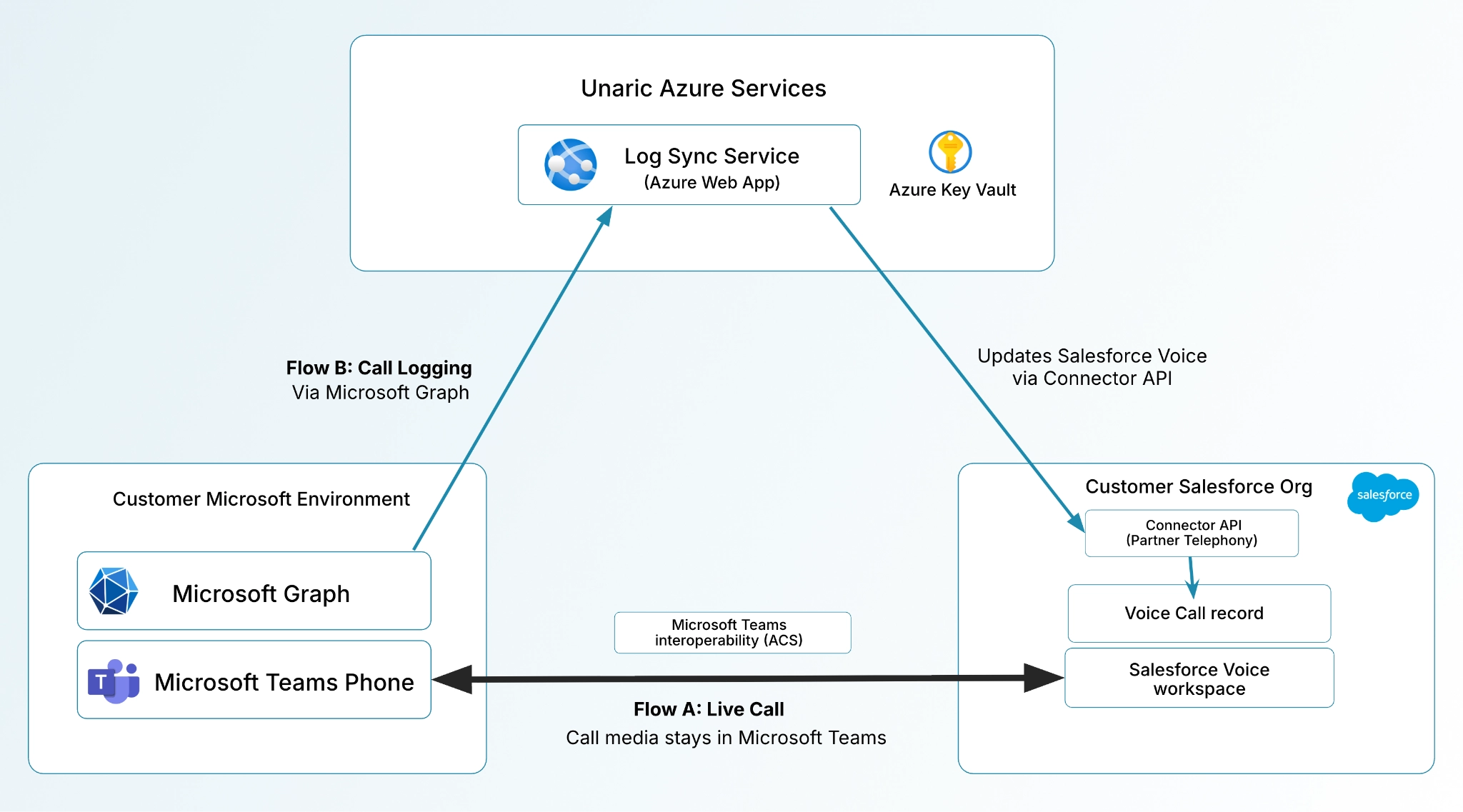

Live Media
Call media stays in Microsoft Teams. Unaric is not in the live audio path.

Controls
Salesforce Voice owns the dialer. Unaric maps its actions to Teams Phone through the Partner Telephony connector.

Logging
Call activity is read via Microsoft Graph and written to the Salesforce Voice Call record.
Teams calling in Salesforce, in a single onboarding call.
Install the Salesforce package, then complete two authorizations in the Unaric Teams Admin Portal.

Salesforce package
Add the managed package to your Salesforce org.

Microsoft
Approve the enterprise apps in your Microsoft tenant.
Salesforce
Authorize the Salesforce org that hosts Salesforce Voice, then log in.
Planning an
Open CTI transition?
Salesforce has set an Open CTI retirement date of February 28, 2028. Unaric supports both Open CTI and Salesforce Voice on the same Teams Phone foundation, so you run Open CTI through that date and move to Salesforce Voice when the timing fits, without changing telephony providers.

FAQs
What to expect
