

See how Unaric Voice for Microsoft Teams handles live calls, call logging, access, and data flow.
Unaric Voice is built around a simple architecture: Microsoft Teams remains the calling environment, Salesforce remains the system of record for activity, and Unaric connects the two without sitting in the live audio path.
Live call media stays in Teams. Call logging happens separately through Microsoft Graph and is written into your Salesforce org.
Four architecture principles
Live call media stays in Microsoft Teams
Unaric is not in the audio path. Live call audio does not pass through Unaric services.
Logging is separate from the live call
Unaric reads call records from Microsoft Graph after the call event is available. The logging path is separate from the live media path.
Salesforce receives the activity, not the live call
Unaric uses Microsoft call records to create the relevant activity in Salesforce, so Salesforce becomes the system of record for call activity without becoming the phone system.
Customer access stays customer-controlled
Access to Microsoft 365 and Salesforce is granted and managed by the customer in their own environments. Access follows a least-privilege model and uses only the permissions required for the integration to run.
The architecture at a glance
Unaric Voice connects three places:
Your Microsoft 365 tenant, including Teams and Microsoft Graph
Your Salesforce org
Unaric Azure services, which handle the secure integration and logging workflow
There are two distinct flows:
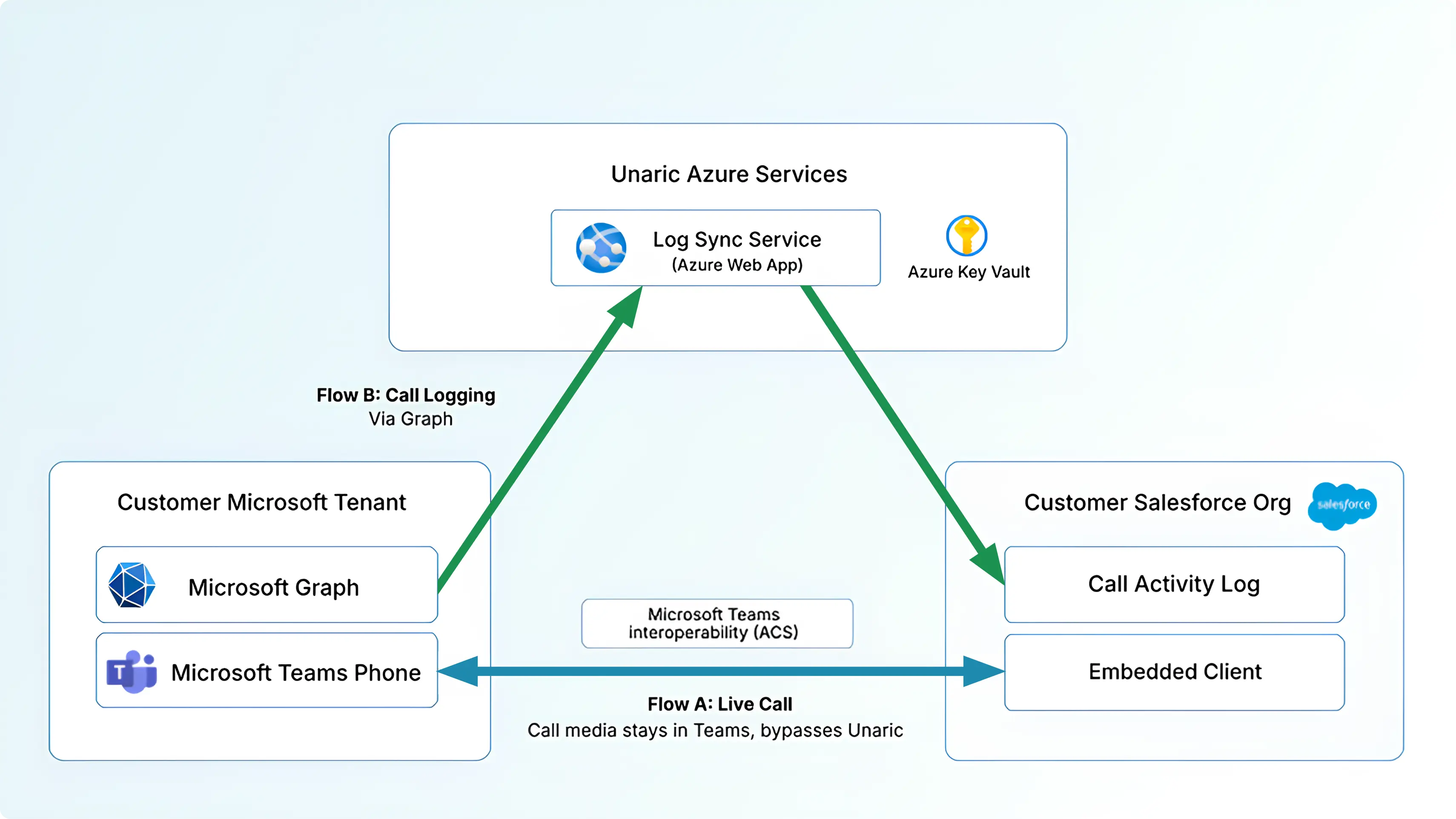
Live call stays in Teams
A user places or receives a call in Microsoft Teams. The live call remains inside Microsoft Teams. Unaric does not carry or route the live audio stream.
Logging is a separate flow
After the call event is available, Unaric reads the relevant call record from Microsoft Graph, processes the data needed for logging, and writes the resulting activity into the customer’s Salesforce org.
That separation is the key architectural point. Teams remains the phone system. Salesforce receives the activity. Unaric connects the two without becoming another calling platform in the middle.
Why answering in Teams still logs to Salesforce
A live call does not need to pass through Unaric for Salesforce to receive the activity. That is because the live call and the logging flow are separate.
The live call stays in Microsoft Teams
The call record becomes available through Microsoft Graph
Unaric uses that call record to write the activity into Salesforce
This is why teams can keep using Teams for calling, including normal answering behavior in Teams, while Salesforce still receives the related call activity. Calls made or received in Teams can also be logged in the background for mobile use cases, without requiring the live call itself to move through Unaric.
What Unaric accesses — and what it does not
Unaric uses customer-granted access to connect Microsoft Teams and Salesforce for logging and workflow support. Customers continue to control access in their own Microsoft and Salesforce environments.
What Unaric accesses
Access to the Microsoft call records required for logging
Access to write the resulting activity into the customer's Salesforce org
Secure handling of the credentials and tokens required for the integration to run
What Unaric does not do
Unaric is not designed as a separate telephony platform between Teams and Salesforce.
Carry live call audio
Replace Microsoft Teams as the calling environment
Store customer call media in a separate Unaric call database
Require a separate phone system to get call activity into Salesforce
Data boundaries
The architecture is designed to keep clear boundaries between live calling, logging, and service operations.
Access control and credential handling
Customers control access in their own environments.
Microsoft access
Microsoft access is granted by the customer through their Microsoft environment.
Access remains scoped to the integration rather than broad unrestricted access.
Salesforce access
Salesforce access is granted by the customer through their Salesforce environment.
Tokens and credentials
Integration credentials and tokens are handled securely.
Tokens are stored in Azure Key Vault.
This gives customers control over how the integration is connected, reviewed, and managed.
Data hosting and security boundaries
- Live call media remains in Microsoft Teams
- Logged activity is written into the customer's Salesforce org
- Data exchanged by the integration is encrypted in transit
- Unaric does not store customer call media in a separate call-data database
- Azure services used by the integration can be deployed with region-aware hosting
This page covers the high-level architecture and data boundaries. If your team needs a deeper review, additional architecture and security materials are available.
What this does not require
Unaric Voice is designed to work with your existing Teams calling setup.
Teams remains where telephony is managed
Salesforce remains where activity is logged and worked
Unaric handles the connection between the two
The live call path does not need to be rebuilt to support logging in Salesforce
Most updates to the integration are handled server-side in the service layer and do not typically require customer admin action or retesting. The core architecture does not change: live call media remains in Teams, and logging remains a separate sync flow.
Common question
Need a technical review?
If your team wants to review architecture, access, or data handling in more detail, we can walk through your setup and answer technical questions directly.