Salesforce Open CTI end of life for Teams Phone users

Moving off Open CTI? Keep Teams Phone as your phone system.

Unaric connects Microsoft Teams Phone to Salesforce Voice, now called Partner Contact Center, and is available today.

  • Each call saved in Salesforce with its live transcript
  • Teams move one at a time, with a Unaric engineer
  • Unaric runs alongside your current integration while teams move
Plan your move See how the move works

Already on Unaric? Your customer success manager plans your move with you.

Last updated 6 November 2026

At a glance

Retirement date
28 February 2028, set by Salesforce.
New orgs
Open CTI is already unavailable for Agentforce Service orgs created since 16 February 2026.
Salesforce's path
A Salesforce Voice offering, such as Partner Contact Center.

Why move to Salesforce Voice

What Salesforce Voice adds, on the Teams Phone you keep

The phone system stays the same. What changes is how much each call gives you in Salesforce: for service teams, calls in Omni-Channel with a live transcript; for sales teams, click to dial from cadences, calls logged from Teams mobile, and reports per rep.

What stays the same

  • Microsoft Teams Phone
  • Your numbers
  • Your call queues and routing
  • Teams Admin Center
What you get
On Open CTI
On Salesforce Voice with Unaric
One standard record per call
On Open CTIA Task
On Salesforce Voice with UnaricA Voice Call record, Salesforce's standard object for calls, on the Contact, Account and Lead, with notes and call resolution
The conversation in Salesforce
On Open CTINot part of Open CTI
On Salesforce Voice with UnaricA live transcript on the Voice Call record, in more than 30 languages, with consent controls for your admins
A colleague sees what was said
On Open CTINot part of Open CTI
On Salesforce Voice with UnaricWhen transcription is on, a colleague you consult sees the transcript so far, so the caller does not repeat themselves
Reporting you can trust
On Open CTIBuilt on Tasks
On Salesforce Voice with UnaricSalesforce's standard reports and dashboards per rep and per queue, including calls answered on Teams mobile
A call summary written for you
On Open CTINot part of Open CTI
On Salesforce Voice with UnaricWith Salesforce's Agentforce for Service add-on, Work Summaries writes the summary, issue and resolution, and next best action suggests what to do next
One place to work
On Open CTIAn Open CTI softphone in Salesforce
On Salesforce Voice with UnaricCalls arrive in Omni-Channel, Salesforce's own work routing, with Teams presence kept in step
Sales cadences
On Open CTIClick to dial
On Salesforce Voice with UnaricClick to dial from records and Sales Engagement cadences, on Teams Phone
Future
On Open CTIIn maintenance mode since 2020, retiring 28 February 2028
On Salesforce Voice with UnaricSalesforce's recommended path


Already have Salesforce Voice licenses? If they came with your Salesforce agreement, Unaric puts them to work on the Teams Phone calls you already make.

What reps see

The same Teams call, in a different workspace

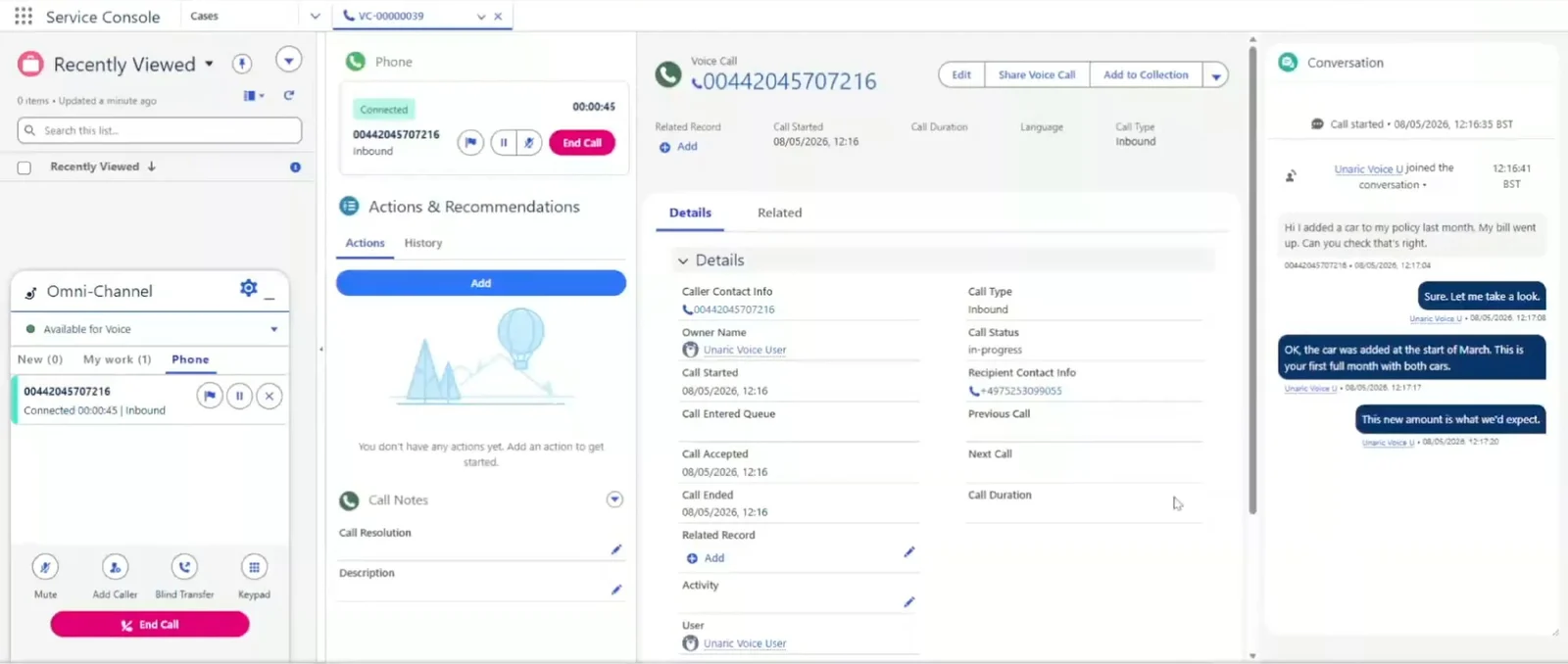
On Salesforce Voice, reps handle the Teams Phone call in Salesforce's own Omni-Channel, and each call is saved as a Voice Call record with its live transcript.

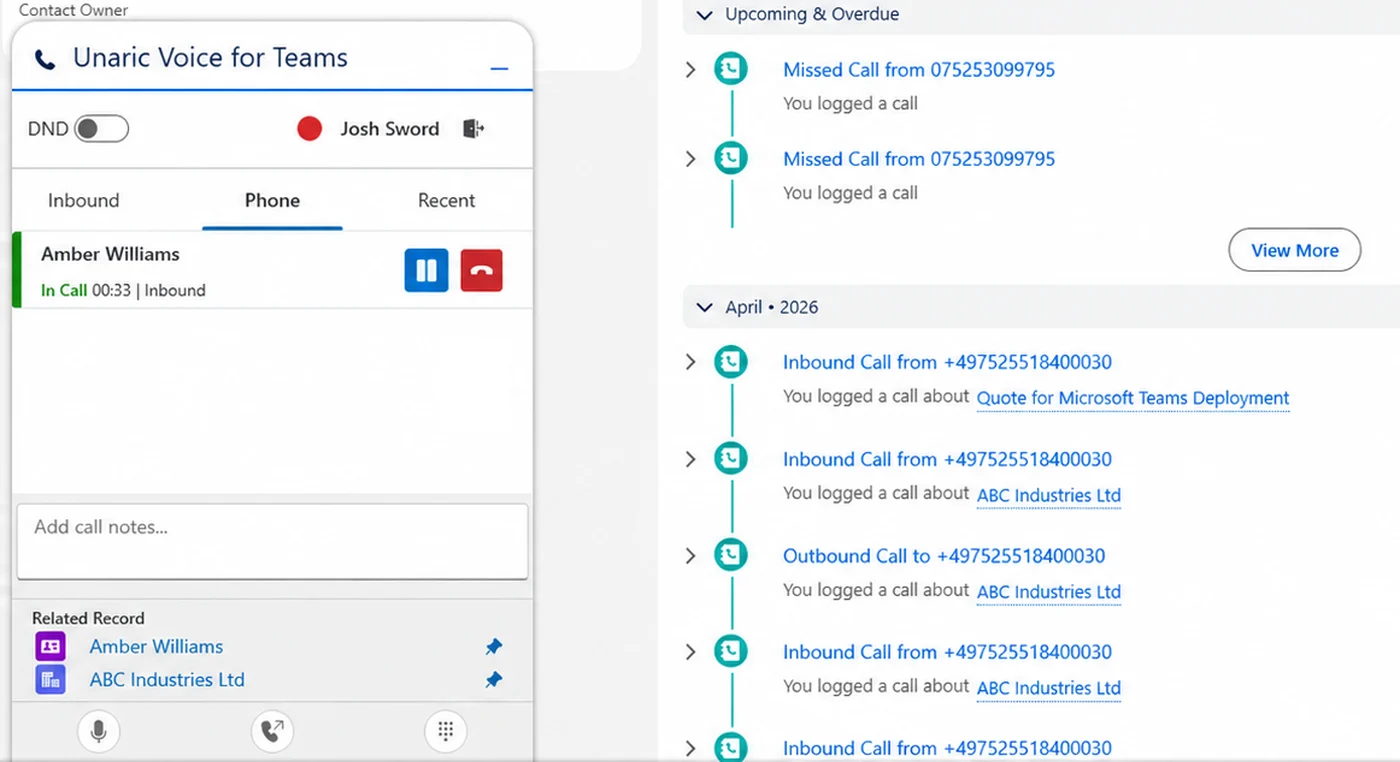
Open CTI

Open CTI: the Unaric client inside Salesforce during a call, with hold and end buttons, call notes, related records and mute, transfer and keypad controls, next to the Activity timeline listing call tasks.
  1. 1The Unaric client, where reps answer and control calls.
  2. 2Hold, mute, transfer and keypad.
  3. 3Calls are saved in the Activity timeline as call tasks.

Salesforce Voice

Salesforce Voice: the Salesforce Service Console during a Teams Phone call, with the Omni-Channel client and its call controls, the Voice Call record, and the live transcript in the Conversation panel.
  1. 1Salesforce's Omni-Channel, where reps answer and control calls.
  2. 2Hold, mute, transfer and keypad.
  3. 3Each call is saved as a Voice Call record.
  4. 4The live transcript, written as the call happens.

Is this the right path for you?

Built for teams that run on Teams Phone and Salesforce

A good fit if

  • Microsoft Teams Phone is your phone system, or is being rolled out
  • Salesforce is your CRM, for sales, service or both
  • 15 or more people take customer calls
  • You want calls handled and logged in Salesforce, with a live transcript

Probably not the right path if

  • You are still choosing a phone system and Teams Phone is not the plan

Check with us first if

  • Your teams rely on a feature from your current tool, such as three-way calling or masked dialling

Choosing a path

Three questions to ask about any migration path

You will hear several ways to move off Open CTI. If Teams Phone is your phone system, these are the questions that matter.

Does Teams Phone stay your phone system?

Yes. Your numbers, queues and routing stay in Teams, managed in Teams Admin Center. Unaric connects Teams Phone to Salesforce without a separate telephony platform.

Do reps work inside Salesforce's own workspace?

Yes. Reps handle calls in Salesforce Voice's telephony interface, in Omni-Channel, next to the record. Not in a separate window or app.

Are calls answered away from Salesforce still logged?

Yes. Calls answered on Teams mobile or a desk phone are logged in Salesforce from Microsoft call records, as long as the call stays in Teams.

Customer story

When Teams Phone is non-negotiable

BDO · Professional services

IT made native Teams Phone integration a hard requirement

BDO

Requirement

No third telephony platform, and no new phone system for IT

Fix

Unaric integrated Teams Phone with Salesforce directly

Outcome

Selected Salesforce in an RFP that required native Teams Phone integration

How the move works

An engineer-led move, at your pace

A named Unaric engineer leads a fast setup in your sandbox, then each team goes live once its testing is done. Your Teams Phone setup does not change at any step.

1

Plan

List your teams, your numbers and the reports built on call data.

2

Set up in a sandbox

In the Unaric admin portal, your admins authorize Microsoft, connect the Salesforce org and install the package.

3

Test with your users

Your own users test calls, logging and reports in the sandbox before anything goes live.

4

Go live team by team

Each team moves when it is ready, on your timeline.

Before you start

Your current integration

Unaric runs alongside it for different users, so each team moves after testing.

Licenses

Each user needs a Salesforce Voice license from your Salesforce account team. Agentforce for Service is optional.

Not sure you're on Open CTI?

Your Salesforce admin can check in Setup. Open CTI runs through a call center; Salesforce Voice runs through a contact center in Omni-Channel.

What works differently

Known up front, planned with you

A few things work differently on Salesforce Voice. Each one is known up front, so we plan it with you before any team moves.

Area
On Salesforce Voice
How you plan for it
Where calls appear
On Salesforce VoiceIn the Voice Calls related list on the Contact, Account and Lead, not the Activity timeline.
How you plan for itAdmins can rearrange the page, and a flow can also copy each call into a task.
Time on hold
On Salesforce VoiceReps can put callers on hold, but time on hold is not recorded. Time waiting in the queue before answer is.
How you plan for itReport on queue wait rather than hold time.
Notes, subject and result
On Salesforce VoiceNotes on the Voice Call record, during or after the call. One result dropdown with values you define. The subject cannot be edited.
How you plan for itAgree your result values before a team moves.
Linking a record
On Salesforce VoiceReps select one related record, such as a case or opportunity, on each call.
How you plan for itAdd your own lookup fields or a flow if you need more links.
Calling interface
On Salesforce VoiceSalesforce's standard Omni-Channel, the same across channels.
How you plan for itYour admin arranges the Voice Call page.

Readiness checklist

Salesforce's checklist, answered for Teams Phone

Salesforce's own pre-migration assessment covers four areas. Here is how each one looks when your calls run on Teams Phone, plus two Salesforce does not cover.

Area
What to check
With Teams Phone and Unaric
What your current tool does
What to checkFeatures your teams rely on today, such as three-way calling, texting or masked dialling
With Teams Phone and UnaricCheck each one with us before any team moves, so nothing your teams depend on is missed.
Users in the call center
What to checkWhich users and teams use Open CTI today
With Teams Phone and UnaricMove them one team at a time. Each user is mapped to the Salesforce org in the Unaric admin portal.
Phone numbers
What to checkWhich numbers ring which teams
With Teams Phone and UnaricYour numbers stay in Teams Phone. Nothing to port.
Reports and dashboards
What to checkWhich reports are built on call Tasks
With Teams Phone and UnaricThe main work item: move them to Voice Call records and Salesforce's standard voice reports. While teams move, both data models sit in the same org.
Custom logic
What to checkRouting rules, screen pops and any custom Open CTI code
With Teams Phone and UnaricRouting stays in Teams. On answer, Salesforce opens the Voice Call record and a matching contact, and click to dial is handled by Salesforce Voice. Custom Open CTI code needs replacing: review it with us in the migration call.
Calls answered outside Salesforce
What to checkDo people answer on Teams mobile or a desk phone?
With Teams Phone and UnaricThose calls are still logged in Salesforce from Microsoft call records, as long as the call stays in Teams.

What Salesforce has announced

What stops working on 28 February 2028

Open CTI has been in maintenance mode since 2020, with no new features. On the retirement date, these stop working for every org.

  • The Open CTI JavaScript API
  • Call center adapters
  • Softphone layouts and call center files
  • Custom CTI logic, such as screen pops and routing rules

Already in effect for new orgs. Since 16 February 2026, Open CTI is unavailable for newly created Agentforce Service orgs. If you are setting up a new Salesforce org, Salesforce Voice is the path today, not in 2028.

Source: Salesforce Trailhead, Prepare for Open CTI Retirement. Salesforce recommends one of its Salesforce Voice offerings, such as Partner Contact Center or Agentforce Contact Center.

FAQ

Questions about the move

Do we need Salesforce Voice licenses as well as Unaric?

Yes. Each user needs a Salesforce Voice User (Partner Telephony) license from Salesforce, alongside Unaric and a Microsoft Teams Phone license. Salesforce Voice is what turns each call into a standard Voice Call record, with a live transcript, standard voice reports and a base for Agentforce for Service. Your Salesforce account team handles Salesforce Voice licensing.

What happens when Salesforce retires Open CTI in February 2028?

Salesforce has published 28 February 2028 as the retirement date for Open CTI. Salesforce recommends moving to a Salesforce Voice offering, such as Partner Contact Center. With Unaric, teams on Microsoft Teams Phone move to Salesforce Voice one at a time, in the same Salesforce org.

How do I migrate from Open CTI to a supported alternative?

Salesforce recommends moving to a Salesforce Voice offering, such as Partner Contact Center (formerly Service Cloud Voice). If your calls run on Microsoft Teams Phone, Unaric connects Teams Phone to Salesforce Voice, and you move one team at a time in the same Salesforce org. Your numbers stay in Teams Phone, and new calls are saved as Voice Call records.

How do I prepare for the Open CTI retirement?

Start with what Open CTI does for your teams today: the features they rely on, which users and teams use it, which reports are built on call Tasks, and any custom Open CTI code. Salesforce's pre-migration assessment covers these areas, and the checklist on this page shows how each one looks when your calls run on Teams Phone. Salesforce has published 28 February 2028 as the retirement date.

What is the difference between Open CTI and Salesforce Voice (formerly Service Cloud Voice)?

Open CTI is Salesforce's older telephony framework: it pops the caller's record, enables click to dial, and logs calls as Tasks, with any transcript or summary in each vendor's own custom fields. Salesforce Voice makes each call a Voice Call record, with a live transcript, standard voice reports and a base for Agentforce for Service. Salesforce has published 28 February 2028 as the retirement date for Open CTI.

We are setting up a new Salesforce org. Can we use Open CTI?

Not if it is a new Agentforce Service org. Since 16 February 2026, Open CTI is unavailable for newly created Agentforce Service orgs, so Salesforce Voice is the path. With Unaric, Microsoft Teams Phone connects to Salesforce Voice from day one.

Can Unaric run alongside our current phone integration?

Yes, for different users. In Salesforce each telephony provider has its own call center, and each user belongs to one call center at a time. So one team can use Unaric while everyone else stays on your current integration.

What happens to our existing Open CTI call history?

Nothing is lost. Your Open CTI call tasks stay in Salesforce, in the same org as the Voice Call records for your new calls. They are not converted automatically: if you want that history as Voice Call records, Unaric Professional Services can help migrate it once you have moved. Reports built on call tasks need rebuilding on Voice Call records, which work with Salesforce's standard voice reports.

Do Salesforce Voice calls show in the Activity timeline?

No. On Salesforce Voice each call is a Voice Call record, not a task, so it sits in the Voice Calls related list on the Contact, Account and Lead rather than under Activity. Admins can rearrange the record page, and if you also want calls in the Activity timeline, a flow can copy each call into a task, agreed with you during setup.

Why move from Open CTI to Salesforce Voice?

Salesforce Voice saves each Microsoft Teams Phone call as a Voice Call record with standard fields and the transcript, so Agentforce for Service can read every call the same way where you license it. Standard fields include Call Started, Call Duration, Previous Call and Next Call. On Open CTI each call is a task, and each vendor stores the transcript and summary in its own custom fields. Calls arrive in Omni-Channel alongside your other channels, and on a consulted transfer the colleague sees the transcript so far. Plan your move to fit your timeline.

Do we have to replace Microsoft Teams Phone?

No. With Unaric, Microsoft Teams Phone stays your phone system. Your numbers, call queues and routing stay in Teams, and your admins keep managing them in Teams Admin Center.

See all questions

Plan your move with a Unaric engineer

We walk through your teams, numbers and call reports, and plan your setup in your sandbox.

Plan your move