


Microsoft Teams Phone integration for Salesforce Voice
Log Teams calls automatically and keep your team working in Salesforce.
Unaric connects Microsoft Teams Phone to Salesforce Voice for your service and sales teams.
- Calls answered on Teams mobile or a desk phone are logged in Salesforce
- Make, answer and transfer Teams calls in Salesforce, with a live transcript
- Teams Phone stays your phone system
 Salesforce Partner Contact Center telephony partner
4.96 from 156 AppExchange reviews
Teams Phone customers who chose Unaric






Wherever the call is made or answered
- In Salesforce
 In the Teams app, on desktop or mobile
- On a Teams desk phone
- With Salesforce closed
Logged automatically
On the contact in Salesforce
As a Voice Call record, with no one typing it up
Automatic call logging
No more manual call logging, even on Teams mobile
Customer calls are logged as Voice Call records wherever they're made or answered: in Salesforce, in the Teams app on desktop or mobile, or on a Teams desk phone, even with Salesforce closed. Sellers on the road are covered as well as agents at a desk.
No one has to enforce rules about where people answer.
Salesforce Voice workspace
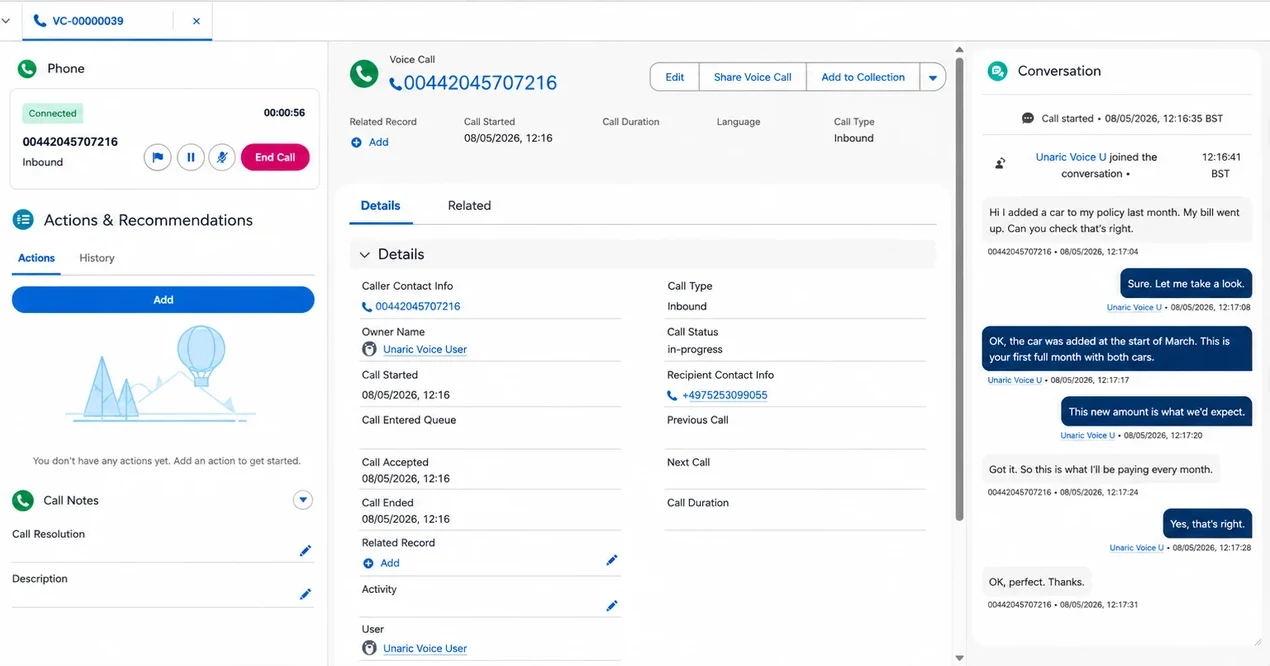
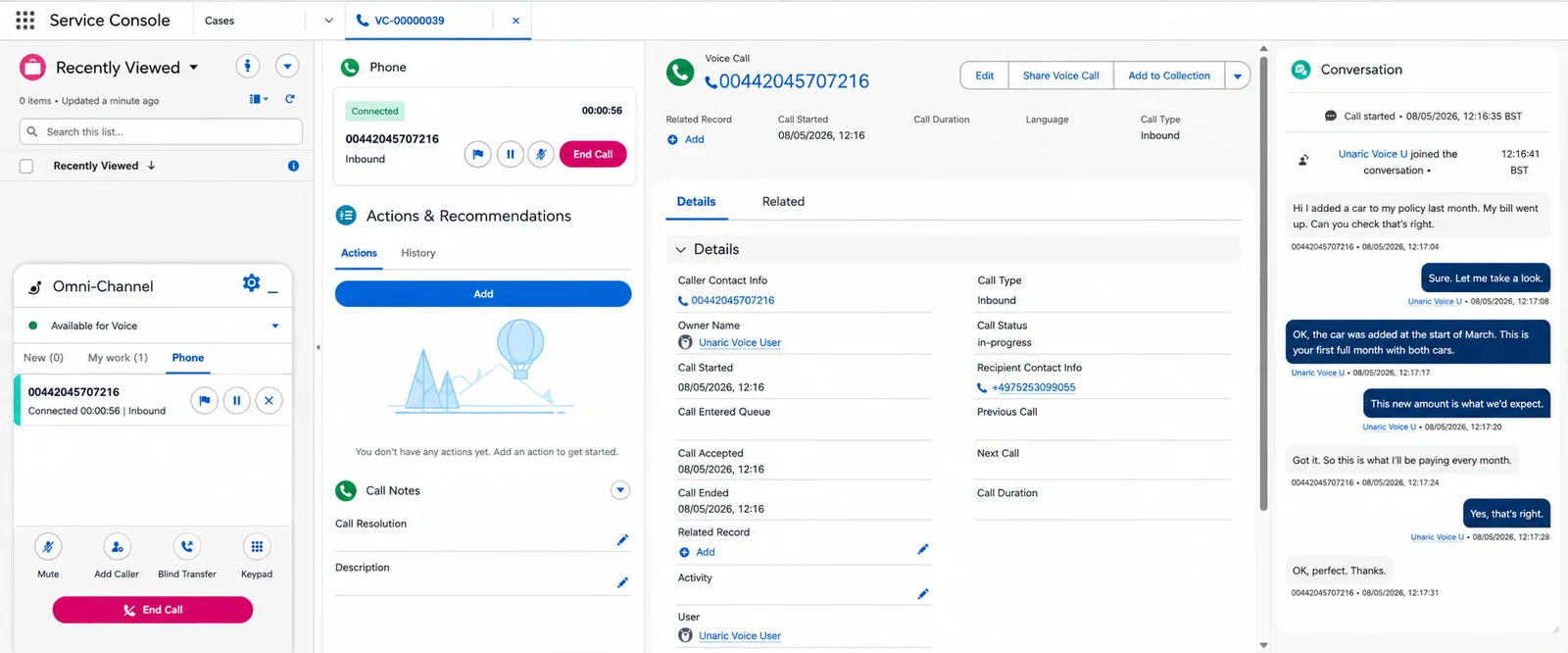
Your team handles Teams calls without leaving Salesforce
Unaric brings Teams Phone calls into the Salesforce Voice workspace (formerly Service Cloud Voice), so the conversation, the notes and the outcome sit together, whether the call is about an opportunity or a case.
So reps spend the call on the customer, not on switching between Teams and Salesforce.
 1
2
3
- 1
Calls handled in Salesforce
Answer, mute, hold, transfer and the keypad in Salesforce control the Teams Phone call.
- 2
Each call is a Voice Call record, not a Task
The record Salesforce's standard reports are built on, with notes and outcomes saved to it.
- 3
A live transcript in Salesforce
Both sides of the call are transcribed into Salesforce as it runs.
Live transcript and Agentforce
The whole conversation in Salesforce, so Agentforce can work on your calls
With Unaric, calls answered in Salesforce get a live transcript of both sides. Salesforce's Agentforce for Service works from it, suggesting next steps while the customer is still on the line and writing the wrap-up when the call ends.
Without the transcript, Agentforce has nothing from the call to work with.
 Conversation
Hi, I added a car to my policy last month. My bill went up. Can you check that's right?
OK, the car was added at the start of March. This is your first full month with both cars.
This new amount is what we'd expect.
Got it. So this is what I'll be paying every month.
Yes, that's right.
Call ends
 Wrap-Up
 Get Agentforce Recommendations
- Summary
- The conversation involved a customer asking why their bill went up after adding a car to their policy. The agent confirmed it is the first full month billed for both cars, and the customer confirmed the new monthly amount.
- Issue
- Higher bill after adding a car to the policy.
- Resolution
- The agent confirmed the new amount is correct and expected for both cars.
Example call. Agentforce for Service is a Salesforce add-on.
Reporting
Know what your team is doing on calls, without asking them
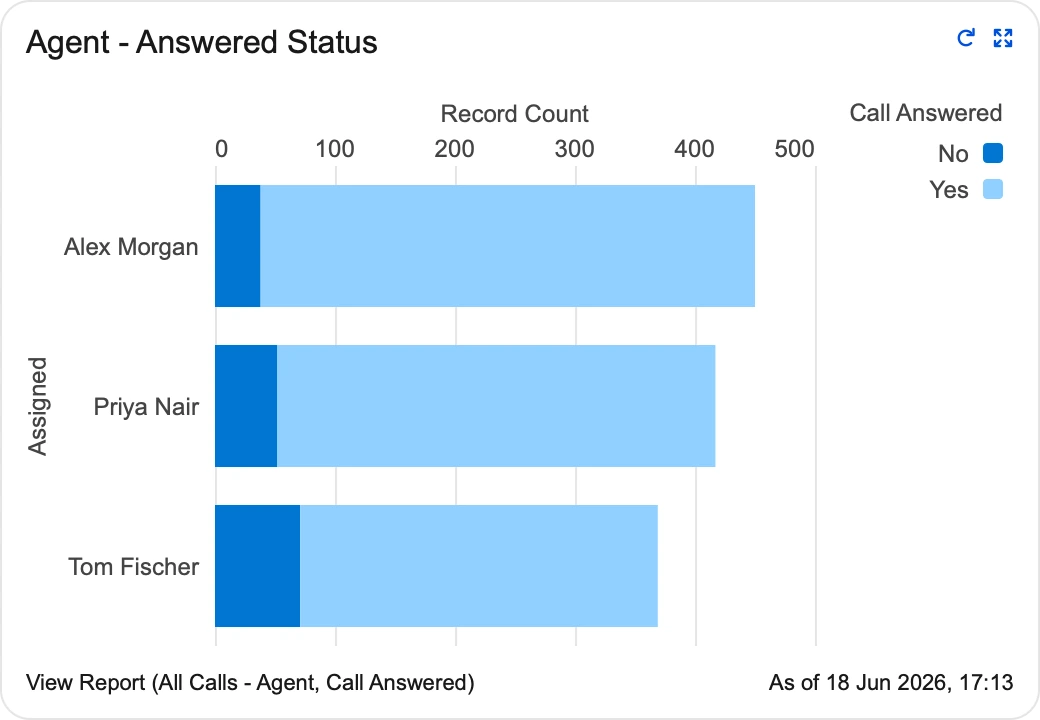
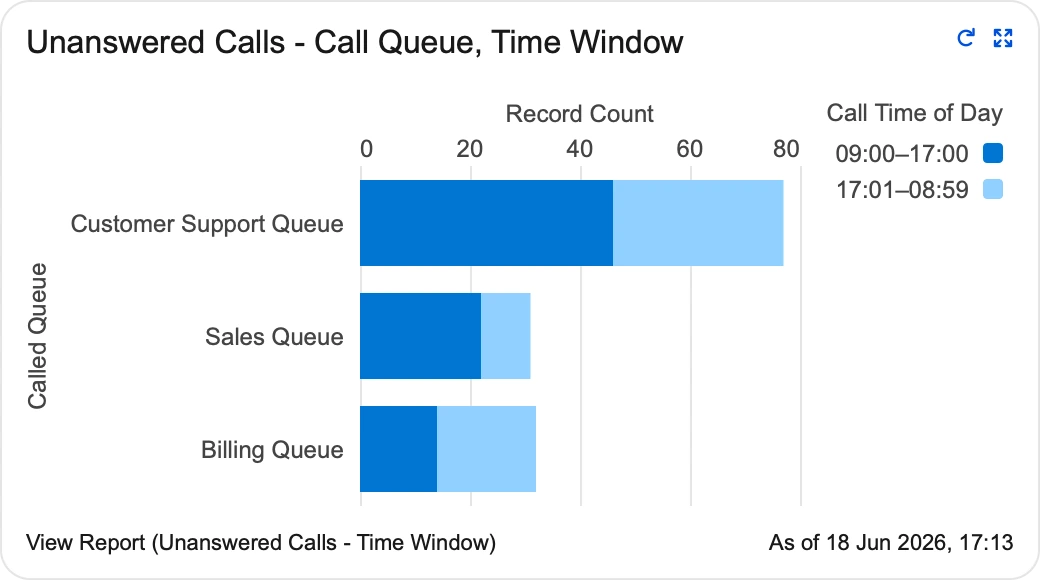
Unaric adds a ready-made calls dashboard to your Salesforce org: inbound and outbound calls, minutes, and answered and missed calls for each rep and each queue, plus your busiest hours. You can change it to track your own KPIs.
So managers see real activity, not self-reported numbers.
The difference
Teams Phone and Salesforce: separate vs connected by Unaric
Separate
Calls happen in Teams. Records live in Salesforce.
Reps call in Teams and type notes into Salesforce later, if they remember
Your team switches between Teams and Salesforce on every call
What the customer said never reaches Salesforce
Connected by Unaric
Teams Phone runs the calls. Salesforce runs the work.
Customer calls log automatically, including on Teams mobile and desk phones
Your team makes, answers and transfers Teams calls in Salesforce, with the matching contact open
Calls answered in Salesforce get a live transcript, ready for Salesforce's Agentforce for Service
More capabilities
More you can do with Teams calls in Salesforce
- Reps click to dial from Sales Engagement cadences, on Teams Phone
- Consult transfer to any Teams user in the company
- One deployment across several Salesforce orgs or Teams tenants
- Reps can flag a supervisor during a call, without the customer seeing
- Teams presence and Omni-Channel status kept in step
- Reps keep their own Teams number, for calls in and out
On Open CTI today? Plan your move to Salesforce Voice before Open CTI retires in February 2028.
See how the move worksFor IT
Your phone system does not change
Salesforce gets the calls without IT taking on another voice platform to secure or run.
Salesforce's official telephony path
Unaric connects through Salesforce's Partner Telephony model, and Salesforce lists Unaric as a telephony partner.
Admin stays in Teams Admin Center
Numbers, queues, routing and calling policies stay where IT manages them today.
Your call data stays with you
Call audio stays in Teams, and Unaric is not in the audio path. Call records and transcripts are written to your Salesforce org, not to a Unaric database.
For your security review
Your admins grant access, with least privilege Published DPA under EU GDPR, UK GDPR and Swiss law Read security and architectureSetup
A fast setup in your sandbox
The first three steps happen in the Unaric admin portal. Bring your Microsoft admin to the kickoff: all they do is sign in and approve Unaric's apps.
- 1
Authorize Microsoft
Your Microsoft admin approves access in your tenant.
- 2
Connect Salesforce
Your admin authorizes the Salesforce org that runs Salesforce Voice.
- 3
Install the Salesforce package
Your Salesforce admin installs the managed package in your sandbox.
- 4
Test and go live
Your team configures, tests and approves with a named Unaric engineer, then goes live once your own testing is done.
Is it a fit?
You'll get the most from Unaric if you
- run Microsoft Teams Phone, or are rolling it out now
- use Salesforce Voice, or plan to
- want calls handled in Salesforce without adding a calling platform
- have 15 or more people who take customer calls
Pricing
From $50
per user per month. 15-user minimum.
Volume discounts available. Enterprise pricing on request. Salesforce Voice (Partner Telephony) is licensed from Salesforce.
Book a demoFAQ
Questions buyers and IT ask
How do we integrate Salesforce with Microsoft Teams for calling?
With a telephony integration that connects Microsoft Teams Phone to Salesforce Voice, such as Unaric, so reps make, answer and log Teams Phone calls in Salesforce. Salesforce lists Unaric as a Partner Contact Center telephony partner. Salesforce's own app for Microsoft Teams is a different tool: it brings Salesforce records into Teams chats, channels and meetings, but it does not handle phone calls.
Are calls made or answered on the Teams mobile app logged to Salesforce?
Yes. Calls made or answered on the Teams mobile app are logged to Salesforce Voice as Voice Call records, from Microsoft call records, even with Salesforce closed, as long as the call stays in Teams. This works whichever way your Teams Phone numbers are connected. The record reaches Salesforce after a slight delay, once Microsoft makes its call record available, and the call uses Teams' own transcription.
Do we need Salesforce Voice licenses as well as Unaric?
Yes. Each user needs a Salesforce Voice User (Partner Telephony) license from Salesforce, alongside Unaric and a Microsoft Teams Phone license. Salesforce Voice is what turns each call into a standard Voice Call record, with a live transcript, standard voice reports and a base for Agentforce for Service. Your Salesforce account team handles Salesforce Voice licensing.
What happens when Salesforce retires Open CTI in February 2028?
Salesforce has published 28 February 2028 as the retirement date for Open CTI. Salesforce recommends moving to a Salesforce Voice offering, such as Partner Contact Center. With Unaric, teams on Microsoft Teams Phone move to Salesforce Voice one at a time, in the same Salesforce org.
Where are transcripts and recordings stored, and who can access them?
The live transcript goes from the rep's own calling client straight to Salesforce, so Unaric does not receive or store it. It is saved in your Salesforce org, where your own admins control access. Call recordings stay in your Microsoft 365 tenant or your recording platform. See the security and architecture page.
Can every call be recorded automatically?
Call recording runs in Microsoft Teams or in your compliance recording platform, not in Unaric. Recording every call automatically needs a compliance recorder on Teams Phone. Separately, the live transcript can start automatically the moment a call is answered in Salesforce, so no one has to remember to switch it on.
Which Microsoft Teams Phone licenses and calling plans do users need?
Each user needs a Teams Phone license, either Teams Phone Standard or Teams Phone with a Calling Plan, and must be enabled for enterprise voice in Teams. Calling Plans, Direct Routing and Operator Connect are all supported, and you can mix license types across users. Your phone numbers come from your Teams Phone setup.
Is Salesforce Voice only for service teams?
No. Despite the old Service Cloud Voice name, Salesforce Voice works for sales teams as well as service teams, in the sales console and the service console. With Unaric, sales and service reps handle their Microsoft Teams Phone calls in Salesforce Voice.
Book a 30-minute demo tailored to your setup
What to expect
- A few quick questions about your Teams Phone and Salesforce Voice setup and what you want to improve
- A live demo of Unaric based on how your team handles calls in Salesforce Voice
- A practical discussion of fit, rollout path, and technical review needs