
Native by design
Microsoft Teams Phone Salesforce Integration
Make and receive Teams Phone calls inside Salesforce. Call queues and routing stay managed in Teams Admin Center. No separate calling platform required.
Inbound and outbound calling inside Salesforce
See caller and Teams queue as the phone rings
Calls log to Salesforce even when answered in Teams app
Trusted by top companies











What you’ll notice on the next call
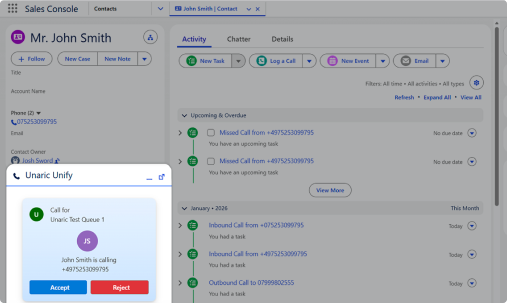
As the phone rings
Teams and Salesforce ring at the same time
Answer in one, and the other stops
Salesforce shows which Teams call queue it came from, and the right record pops up before you answer
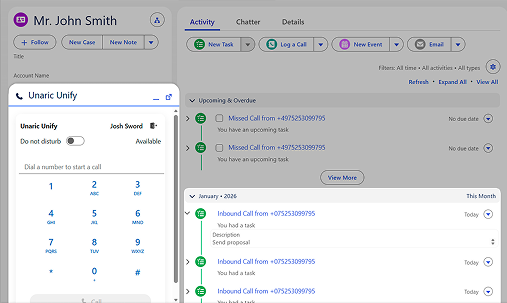
After the call
The call is logged as Salesforce activity on the record, with timestamps
It stays complete even if reps answer in the Teams app (desktop or mobile)
Reps can add notes and outcomes on the record for follow-up and reporting
The Native Difference
Unlike a third-party calling platform, Unaric keeps Teams as the phone system and brings Teams calling into Salesforce.
Salesforce becomes a Teams calling surface, not a separate dialer
You’re not adding another calling platform. Calls in Salesforce are Teams calls.
Keep your Teams Phone setup as-is
Numbers, call queues, routing, caller ID, and policies stay managed in the Teams Admin Center, with no duplicate setup and no extra admin console.
Answer anywhere without losing Salesforce capture
Calls still log on the Salesforce record for follow-up and reporting, even when reps answer in the Teams app (desktop or mobile).
Native vs a third-party calling platform
Third-party calling platform
Unaric native
Where calling is managed
Queues and routing get split across systems.
Teams stays the place you manage queues, routing, caller ID, and policies.
What IT has to run
Another console, plus duplicated setup and access to maintain.
No extra console. Teams Admin Center stays in charge.
Salesforce logging
Logging can end up with gaps when reps answer in the Teams app (desktop or mobile).
Calls log on the Salesforce record even when reps answer in Teams.
Day-to-day rep workflow
Reps end up following rules about where they must answer to keep Salesforce accurate.
Reps work normally. Salesforce logging stays complete without extra rules.
You’ll get the most value from Unaric if:
Already use Microsoft Teams Phone, or you’re rolling it out now
Plan to stay on Salesforce long term
Want to handle Teams calls inside Salesforce without adding a third-party calling platform
Have 15 or more users who need calling and Salesforce logging to stay complete
Pricing
From $47 per user/month
15-user minimum.
Teams Phone inside Salesforce
The right record opens automatically on inbound calls
Calls log to the Salesforce record even when reps answer in Teams
Volume discounts available. Enterprise pricing on request.
Using Service Cloud Voice?
If you’re Service Cloud Voice or planning a move, see the dedicated path.
FAQs
Book a 15-min call to scope your demo
Fill this out and you’ll be able to pick a time instantly.
Step 1 (15 min): confirm your Teams Phone + Salesforce setup and what you want to see
Step 2 (30 min): tailored demo focused on your call flows and Salesforce capture
